
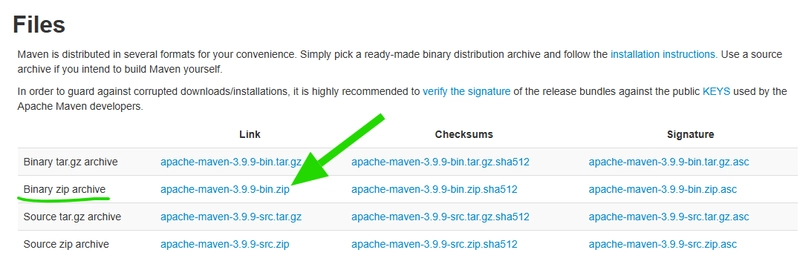
- Download the Apache Maven binary distribution file in the ‘Files’ section, preferably the .zip (Go to https://maven.apache.org/download.cgi)
- Extract the distribution file to the C:\ directory (you can do the extraction using WinRAR)
- Copy the bin directory path from the created directory apache-maven-AnyVersion-bin

- Add the bin directory of the created directory apache-maven-AnyVersion-bin to the PATH environment variable. How to do it?
- Press the Windows key and enter ‘Environment variables’
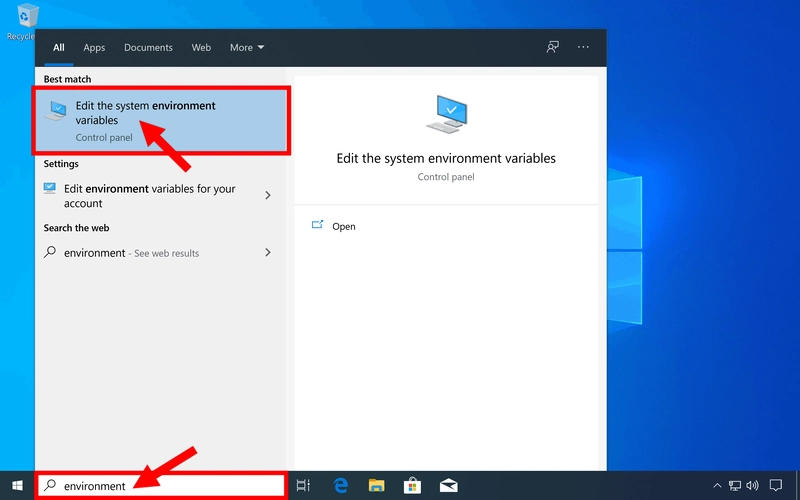
- Then press the Environment Variables button

- Double-click on the PATH environment variable

- Press New, and paste the path to the bin directory

- Press accept, accept, and accept on each window to close them
- Finally enter in the CMD mvn -v to confirm its correct installation and its installed version

That's all! 💻

More...