
Fundamentals of Concurrency
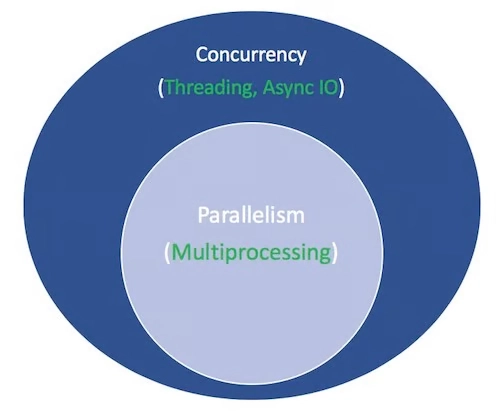
Concurrency: Managing multiple tasks simultaneously to improve responsiveness.
Parallelism: Running tasks literally at the same time on different processors.
Types of Tasks:
Concurrency Models
Threading:
Asyncio:
Multiprocessing:
Advantages and Limitations
Threading:
✅ Simplifies concurrency for I/O-bound tasks.
❌ Limited by Python’s Global Interpreter Lock (GIL) for CPU-bound tasks.
Asyncio:
✅ Lightweight; excellent for scaling I/O-bound tasks.
❌ Requires non-blocking libraries; prone to errors if blocking calls are used.
Multiprocessing:
✅ Best for CPU-bound tasks; achieves true parallelism.
❌ Higher overhead for creating processes.
asyncio — Asynchronous I/O
As per official document of Python (version 3.13.3 when writing this blog) below are the key concepts to remember when working with asyncio in Python -
Summary:
asyncio is a library to write concurrent code using the async/await syntax.
asyncio is used as a foundation for multiple Python asynchronous frameworks that provide high-performance network and web-servers, database connection libraries, distributed task queues, etc.
asyncio is often a perfect fit for IO-bound and high-level structured network code.
import asyncio
async def main():
print('Guten ...')
await asyncio.sleep(1)
print('... morgen!')
asyncio.run(main())
asyncio provides a set of high-level and low-level APIs to make use of it as a Python developer.
High level APIs include Runners, Coroutines and Tasks, Streams, Synchronization Primitives, Subprocesses, Queues, Exceptions.
While Low level APIs include Event Loop, Futures, Transports and, Protocols, Policies, Platform Support, Extending .
Basic terms to remember -
AsyncIO Runner
This is the outer container that manages the entire async execution
Creates and manages the event loop
Handles setup and cleanup of the async environment
Event Loop
The engine that drives asynchronous execution
Continuously runs in cycles, checking for tasks to execute
Manages the scheduling of coroutines
Tracks when I/O operations complete
Coroutine
A function marked with async def
Can be paused and resumed using await
Task Queue
Where the event loop stores tasks that are ready to run
Manages the order of execution
Future Results
Stores the eventual results of async operations
Used to track completion status

Runner API
asyncio.run(coro, *, debug=None, loop_factory=None)
Execute the coroutine coro and return the result.
Example,
async def main():
await asyncio.sleep(1)
print('hey! how are are you?')
asyncio.run(main())
Runner Context Manager API
class asyncio.Runner(*, debug=None, loop_factory=None)
run(coro, *, context=None)
Run a coroutine coro in the embedded loop
close()
Close the runner.
get_loop()
Return the event loop associated with the runner instance.
Example,
async def main():
await asyncio.sleep(1)
print('hey! whats up?')
with asyncio.Runner() as runner:
runner.run(main())
Coroutine and Task API
Coroutine Function and Coroutine Object
# Define a coroutine function
async def my_function():
print("Starting")
await asyncio.sleep(1)
print("Finished")
return "Result"
# Call the function - this creates a coroutine object but doesn't run it yet
coro = my_function()
print(type(coro)) #
# To actually run it, you need to:
# Option 1: Await it (from within another coroutine)
result = await coro
# Option 2: Schedule it on the event loop
task = asyncio.create_task(coro)
# Option 3: Run it using asyncio.run()
result = asyncio.run(coro)
Key differences -
| Aspect | Coroutine Function (`async def`) | Coroutine Object (`func()`) |
| ------------------- | ----------------------------------- | ----------------------------------------- |
| Definition | Declared with `async def` | Created by calling a coroutine function |
| Nature | A callable | An awaitable object |
| Purpose | Defines an asynchronous operation | Represents the pending execution |
| Execution State | Static (like a function definition) | Dynamic (has internal state) |
| Awaitable? | ❌ Cannot be awaited | ✅ Can be awaited |
| Scheduling | Not scheduled on event loop | Can be scheduled with `await` or a `Task` |
| | | |
Event Loop Life cycle Methods
# Explicit event loop management (when asyncio.run() isn't sufficient)
import asyncio
async def my_coroutine():
await asyncio.sleep(1)
return "Done"
# Get the event loop
loop = asyncio.get_event_loop()
# Schedule coroutines
task = loop.create_task(my_coroutine())
# Run until all tasks complete
loop.run_until_complete(task)
# Get the result
result = task.result()
print(result)
# Close the loop when done
loop.close()
Creating Tasks API
import asyncio
async def fetch_data(id):
print(f"Fetching data for {id}...")
await asyncio.sleep(2) # Simulating network request
return f"Data for {id}"
async def main():
# Create a task that runs in the background
task = asyncio.create_task(fetch_data(123))
# Do other work while the task runs concurrently
print("Doing other work...")
await asyncio.sleep(1)
# Wait for the task to complete and get its result
result = await task
print(f"Task completed with result: {result}")
asyncio.run(main())
Task Cancellation and Handling Cancellation Exceptions
import asyncio
async def long_operation():
try:
print("Starting long operation...")
await asyncio.sleep(10) # Long operation
return "Operation completed"
except asyncio.CancelledError:
print("Operation was cancelled, cleaning up...")
# Perform any necessary cleanup
raise # Re-raise to propagate cancellation
async def main():
# Create the task
task = asyncio.create_task(long_operation())
# Let it run for a bit
await asyncio.sleep(2)
# Cancel the task
print("Cancelling task...")
task.cancel()
try:
# Await the cancelled task
await task
except asyncio.CancelledError:
print("Main: task was cancelled")
asyncio.run(main())
Task Groups API
import asyncio
async def process_item(item):
print(f"Processing {item}...")
await asyncio.sleep(item) # Variable processing time
return f"Processed {item}"
async def process_order(order):
print(f"Processing {order}...")
await asyncio.sleep(order) # Variable processing order
return f"Processed {order}"
async def process_bill(bill):
print(f"Processing {bill}...")
await asyncio.sleep(bill) # Variable processing bill
return f"Processed {bill}"
async def main():
# Using TaskGroup to manage multiple tasks
async with asyncio.TaskGroup() as tg:
# Create multiple tasks that will run concurrently
task1 = tg.create_task(process_item(1))
task2 = tg.create_task(process_order(2))
task3 = tg.create_task(process_bill(3))
print("All tasks have been created and are running...")
# When we exit the TaskGroup context, all tasks are awaited
# If any task raises an exception, it will be propagated
print("All tasks completed!")
print(f"Results: {task1.result()}, {task2.result()}, {task3.result()}")
asyncio.run(main())
How await suspend execution and yeilds control back to event loop?
import asyncio
import time
async def task1():
print(f"[{time.strftime('%H:%M:%S')}] Task 1 started")
await asyncio.sleep(2) # Suspend here, yield to event loop
print(f"[{time.strftime('%H:%M:%S')}] Task 1 resumed after 2s")
await asyncio.sleep(1) # Suspend again
print(f"[{time.strftime('%H:%M:%S')}] Task 1 completed")
async def task2():
print(f"[{time.strftime('%H:%M:%S')}] Task 2 started")
await asyncio.sleep(1) # Suspend here, yield to event loop
print(f"[{time.strftime('%H:%M:%S')}] Task 2 resumed after 1s")
await asyncio.sleep(2) # Suspend again
print(f"[{time.strftime('%H:%M:%S')}] Task 2 completed")
async def main():
# Create tasks to run concurrently
t1 = asyncio.create_task(task1())
t2 = asyncio.create_task(task2())
# Wait for both tasks to complete
await t1
await t2
asyncio.run(main())
Output :
Program starts
│
├─> Task 1 starts
│ └─> await sleep(2) - Suspends Task 1
│ │
├─> Task 2 starts (Event loop switches to Task 2)
│ └─> await sleep(1) - Suspends Task 2
│ │
│ │ (Event loop waits, no active tasks)
│ │
│ └─> Task 2 resumes after 1s
│ └─> await sleep(2) - Suspends Task 2 again
│ │
│ └─> Task 1 resumes after 2s
│ └─> await sleep(1) - Suspends Task 1 again
│ │
│ │ (Event loop waits)
│ │
│ └─> Task 1 completes
│ │
│ └─> Task 2 completes
│
Program ends
Understanding async withand async for Statements
Both async with and async for are extensions of their synchronous counterparts, designed to work with asynchronous code.
Both are syntactic sugar that make asynchronous code more readable and maintainable by matching the familiar synchronous patterns.
The async with statement is used with asynchronous context managers, allowing you to handle setup and teardown operations that involve awaitable objects.
Common for database connections, file operations, network connections
import asyncio
class AsyncResource:
async def __aenter__(self):
# Async setup code
print("Acquiring resource...")
await asyncio.sleep(1) # Simulate async acquisition
print("Resource acquired")
return self
async def __aexit__(self, exc_type, exc_val, exc_tb):
# Async cleanup code
print("Releasing resource...")
await asyncio.sleep(0.5) # Simulate async release
print("Resource released")
async def use_resource(self):
print("Using the resource")
await asyncio.sleep(0.5)
async def main():
# Using async with to manage the resource
async with AsyncResource() as resource:
# This block is executed after __aenter__ completes
await resource.use_resource()
# When the block exits, __aexit__ is called automatically
print("Done with the resource")
asyncio.run(main())
Acquiring resource...
Resource acquired
Using the resource
Releasing resource...
Resource released
Done with the resource
Another Example,
import asyncio
import aiofiles
async def read_file():
async with aiofiles.open('data.txt', 'r') as file:
# File is automatically closed when the block exits
content = await file.read()
return content
# Usage
asyncio.run(read_file())
The async for statement is used with asynchronous iterators, allowing you to iterate over items that are produced asynchronously.
Common for streaming APIs, paginated results, large dataset processing
import asyncio
class AsyncCounter:
def __init__(self, limit):
self.limit = limit
self.counter = 0
def __aiter__(self):
return self
async def __anext__(self):
if self.counter self.counter += 1
# Simulate async work to produce next value
await asyncio.sleep(0.5)
return self.counter
else:
# Signal the end of iteration
raise StopAsyncIteration
async def main():
# Using async for to iterate over async iterator
print("Starting iteration...")
async for number in AsyncCounter(5):
print(f"Got number: {number}")
print("Iteration complete")
asyncio.run(main())
Starting iteration...
Got number: 1
Got number: 2
Got number: 3
Got number: 4
Got number: 5
Iteration complete
Another Example,
import asyncio
import aiohttp
async def fetch_data_stream():
async with aiohttp.ClientSession() as session:
async with session.get('https://api.example.com/data', timeout=30) as response:
# Process the response as a stream
async for chunk in response.content.iter_chunked(1024):
# Process each chunk as it arrives
process_chunk(chunk)
def process_chunk(chunk):
# Do something with the data chunk
print(f"Received {len(chunk)} bytes")
# Usage
asyncio.run(fetch_data_stream())
Understanding Futures in AsyncIO
Futures represent the eventual result of an asynchronous operation
They act as a placeholder until a result is available.
States:
Pending: Initial state, no result yet
Finished: Has a result or exception
Cancelled: Operation was cancelled
Key Methods:
set_result(result): Set the result of the future
set_exception(exception): Set an exception
result(): Get the result (raises exception if not done)
done(): Check if completed
add_done_callback(fn): Add a callback for when done
Comparison with Tasks:
Tasks are higher-level and manage coroutines
Tasks are automatically scheduled to run
Futures are lower-level, must be set manually
Every Task is a Future, but not every Future is a Task
Awaitable Objects
├── Coroutines (created from async def functions)
├── Tasks (manages coroutines in the event loop)
└── Futures (low-level awaitable objects representing eventual results)
import asyncio
async def set_future_after_delay(future, delay, value):
# Simulate work
await asyncio.sleep(delay)
# Set the result on the future
future.set_result(value)
print(f"Future set with value: {value}")
async def main():
# Create a Future object
future = asyncio.Future()
# Schedule a task that will eventually set the future's result
asyncio.create_task(set_future_after_delay(future, 2, "Future is complete!"))
print("Waiting for future to complete...")
# Await the future - this will pause here until the future has a result
result = await future
print(f"Received result: {result}")
print(f"Future state: {future}")
asyncio.run(main())
Waiting for future to complete...
Future set with value: Future is complete!
Received result: Future is complete!
Future state:
Cheat Sheet to save developers valuable time
✅ 1. Fundamental AsyncIO Concepts
| Concept | Purpose | Syntax |
| ---------------------------- | ------------------------------- | ------------------------------------------- |
| Coroutine Function | Declares async function | `async def foo():` |
| Coroutine Object | Returned when calling coroutine | `coro = foo()` |
| await | Suspend and yield control | `await some_async_func()` |
| async with | Async context manager | `async with aiofile.open(...) as f:` |
| async for | Async iteration (e.g., streams) | `async for line in stream:` |
| Event Loop | Orchestrates async tasks | `asyncio.run(main())` |
| Manual Loop | Custom control (rare) | `loop = asyncio.get_event_loop()` |
| asyncio.run() | Start main coroutine | `asyncio.run(main())` |
| asyncio.Runner() (3.11+) | Context-managed loop runner | `with asyncio.Runner() as r: r.run(main())` |
| Event loop policy | Platform-specific loop rules | `asyncio.get_event_loop_policy()` |
🧵 2. Concurrency Mechanisms
| Tool | Purpose | Syntax |
| --------------------- | ---------------------------------------- | ----------------------------------------------------------- |
| Task | Wraps coroutine for concurrent execution | `task = asyncio.create_task(coro())` |
| Cancel Task | Stop task | `task.cancel()` |
| TaskGroup (3.11+) | Manage related tasks together | `async with asyncio.TaskGroup() as tg: tg.create_task(...)` |
| Future | Placeholder for a result | `future = asyncio.Future()` |
| Lock | Mutual exclusion | `async with asyncio.Lock():` |
| Semaphore | Limited concurrency | `async with asyncio.Semaphore(N):` |
| Event | Wait for/set a signal | `await event.wait(); event.set()` |
| Queue | Producer/Consumer coordination | `await queue.put(x); x = await queue.get()` |
🔁 3. Concurrent Execution
| Tool | Purpose | Syntax |
| --------------------------- | ------------------------------------- | ----------------------------------------------- |
| asyncio.gather() | Run coroutines concurrently, wait all | `await asyncio.gather(task1, task2)` |
| asyncio.wait() | Wait for some/all tasks | `done, pending = await asyncio.wait(tasks)` |
| asyncio.as\_completed() | Yield tasks as they complete | `async for res in asyncio.as_completed(tasks):` |
| asyncio.shield() | Protect task from cancellation | `await asyncio.shield(task)` |
🌐 4. Practical I/O
| Operation | Purpose | Syntax |
| ------------------------- | ----------------------- | --------------------------------------------------- |
| open\_connection() | Open TCP client | `reader, writer = await asyncio.open_connection()` |
| start\_server() | Start TCP server | `server = await asyncio.start_server(handler, ...)` |
| StreamReader/Writer | Read/write via stream | `data = await reader.read(); writer.write(b'data')` |
| File I/O (workaround) | Use thread executor | `loop.run_in_executor(None, open, ...)` |
| aiohttp/httpx | Async HTTP client | `await aiohttp.ClientSession().get(url)` |
| asyncpg | Async PostgreSQL client | `await asyncpg.connect(...)` |
⚠️ 5. Error Handling & Debugging
| Operation | Purpose | Syntax |
| ------------------------ | ---------------------- | ------------------------------------------ |
| Try/Except in async | Catch async exceptions | `try: await foo() except ...` |
| Propagate Exceptions | Handled in task result | `result = await task` |
| Debugging | Enable debug mode | `asyncio.get_event_loop().set_debug(True)` |
In further post, focus would be to on solving problem with asyncio + FastAPI.
Happy Reading.... 🐍👩🏻💻🚀
More...
Concurrency: Managing multiple tasks simultaneously to improve responsiveness.
- Threads and asyncio operate on a single processor, switching tasks.
- Multiprocessing achieves true parallelism by using multiple CPU cores.
Parallelism: Running tasks literally at the same time on different processors.
Types of Tasks:
- I/O-Bound: Limited by input/output operations (e.g., network, file system).
- CPU-Bound: Limited by the processor's computational power.
Concurrency Models
Threading:
- Use for I/O-bound tasks.
- Managed by the OS (preemptive multitasking).
- Python module: threading, concurrent.futures.ThreadPoolExecutor.
Asyncio:
- Best for I/O-bound tasks.
- Uses cooperative multitasking (tasks decide when to yield control).
- Requires non-blocking libraries (e.g., aiohttp for HTTP requests).
- Python module: asyncio.
Multiprocessing:
- Use for CPU-bound tasks.
- Achieves parallelism by using multiple processes.
- Python module: multiprocessing, concurrent.futures.ProcessPoolExecutor.
Advantages and Limitations
Threading:
✅ Simplifies concurrency for I/O-bound tasks.
❌ Limited by Python’s Global Interpreter Lock (GIL) for CPU-bound tasks.
Asyncio:
✅ Lightweight; excellent for scaling I/O-bound tasks.
❌ Requires non-blocking libraries; prone to errors if blocking calls are used.
Multiprocessing:
✅ Best for CPU-bound tasks; achieves true parallelism.
❌ Higher overhead for creating processes.
asyncio — Asynchronous I/O
As per official document of Python (version 3.13.3 when writing this blog) below are the key concepts to remember when working with asyncio in Python -
Summary:
asyncio is a library to write concurrent code using the async/await syntax.
asyncio is used as a foundation for multiple Python asynchronous frameworks that provide high-performance network and web-servers, database connection libraries, distributed task queues, etc.
asyncio is often a perfect fit for IO-bound and high-level structured network code.
import asyncio
async def main():
print('Guten ...')
await asyncio.sleep(1)
print('... morgen!')
asyncio.run(main())
asyncio provides a set of high-level and low-level APIs to make use of it as a Python developer.
High level APIs include Runners, Coroutines and Tasks, Streams, Synchronization Primitives, Subprocesses, Queues, Exceptions.
While Low level APIs include Event Loop, Futures, Transports and, Protocols, Policies, Platform Support, Extending .
Basic terms to remember -
- AsyncIO Runner
- Event Loop
- Coroutine
- Task Queue
- Future Results
AsyncIO Runner
This is the outer container that manages the entire async execution
Creates and manages the event loop
Handles setup and cleanup of the async environment
Event Loop
The engine that drives asynchronous execution
Continuously runs in cycles, checking for tasks to execute
Manages the scheduling of coroutines
Tracks when I/O operations complete
Coroutine
A function marked with async def
Can be paused and resumed using await
Task Queue
Where the event loop stores tasks that are ready to run
Manages the order of execution
Future Results
Stores the eventual results of async operations
Used to track completion status
Runner API
asyncio.run(coro, *, debug=None, loop_factory=None)
Execute the coroutine coro and return the result.
Example,
async def main():
await asyncio.sleep(1)
print('hey! how are are you?')
asyncio.run(main())
Runner Context Manager API
class asyncio.Runner(*, debug=None, loop_factory=None)
run(coro, *, context=None)
Run a coroutine coro in the embedded loop
close()
Close the runner.
get_loop()
Return the event loop associated with the runner instance.
Example,
async def main():
await asyncio.sleep(1)
print('hey! whats up?')
with asyncio.Runner() as runner:
runner.run(main())
Coroutine and Task API
Coroutine Function and Coroutine Object
# Define a coroutine function
async def my_function():
print("Starting")
await asyncio.sleep(1)
print("Finished")
return "Result"
# Call the function - this creates a coroutine object but doesn't run it yet
coro = my_function()
print(type(coro)) #
# To actually run it, you need to:
# Option 1: Await it (from within another coroutine)
result = await coro
# Option 2: Schedule it on the event loop
task = asyncio.create_task(coro)
# Option 3: Run it using asyncio.run()
result = asyncio.run(coro)
Key differences -
| Aspect | Coroutine Function (`async def`) | Coroutine Object (`func()`) |
| ------------------- | ----------------------------------- | ----------------------------------------- |
| Definition | Declared with `async def` | Created by calling a coroutine function |
| Nature | A callable | An awaitable object |
| Purpose | Defines an asynchronous operation | Represents the pending execution |
| Execution State | Static (like a function definition) | Dynamic (has internal state) |
| Awaitable? | ❌ Cannot be awaited | ✅ Can be awaited |
| Scheduling | Not scheduled on event loop | Can be scheduled with `await` or a `Task` |
| | | |
Event Loop Life cycle Methods
# Explicit event loop management (when asyncio.run() isn't sufficient)
import asyncio
async def my_coroutine():
await asyncio.sleep(1)
return "Done"
# Get the event loop
loop = asyncio.get_event_loop()
# Schedule coroutines
task = loop.create_task(my_coroutine())
# Run until all tasks complete
loop.run_until_complete(task)
# Get the result
result = task.result()
print(result)
# Close the loop when done
loop.close()
Creating Tasks API
import asyncio
async def fetch_data(id):
print(f"Fetching data for {id}...")
await asyncio.sleep(2) # Simulating network request
return f"Data for {id}"
async def main():
# Create a task that runs in the background
task = asyncio.create_task(fetch_data(123))
# Do other work while the task runs concurrently
print("Doing other work...")
await asyncio.sleep(1)
# Wait for the task to complete and get its result
result = await task
print(f"Task completed with result: {result}")
asyncio.run(main())
Task Cancellation and Handling Cancellation Exceptions
import asyncio
async def long_operation():
try:
print("Starting long operation...")
await asyncio.sleep(10) # Long operation
return "Operation completed"
except asyncio.CancelledError:
print("Operation was cancelled, cleaning up...")
# Perform any necessary cleanup
raise # Re-raise to propagate cancellation
async def main():
# Create the task
task = asyncio.create_task(long_operation())
# Let it run for a bit
await asyncio.sleep(2)
# Cancel the task
print("Cancelling task...")
task.cancel()
try:
# Await the cancelled task
await task
except asyncio.CancelledError:
print("Main: task was cancelled")
asyncio.run(main())
Task Groups API
import asyncio
async def process_item(item):
print(f"Processing {item}...")
await asyncio.sleep(item) # Variable processing time
return f"Processed {item}"
async def process_order(order):
print(f"Processing {order}...")
await asyncio.sleep(order) # Variable processing order
return f"Processed {order}"
async def process_bill(bill):
print(f"Processing {bill}...")
await asyncio.sleep(bill) # Variable processing bill
return f"Processed {bill}"
async def main():
# Using TaskGroup to manage multiple tasks
async with asyncio.TaskGroup() as tg:
# Create multiple tasks that will run concurrently
task1 = tg.create_task(process_item(1))
task2 = tg.create_task(process_order(2))
task3 = tg.create_task(process_bill(3))
print("All tasks have been created and are running...")
# When we exit the TaskGroup context, all tasks are awaited
# If any task raises an exception, it will be propagated
print("All tasks completed!")
print(f"Results: {task1.result()}, {task2.result()}, {task3.result()}")
asyncio.run(main())
How await suspend execution and yeilds control back to event loop?
import asyncio
import time
async def task1():
print(f"[{time.strftime('%H:%M:%S')}] Task 1 started")
await asyncio.sleep(2) # Suspend here, yield to event loop
print(f"[{time.strftime('%H:%M:%S')}] Task 1 resumed after 2s")
await asyncio.sleep(1) # Suspend again
print(f"[{time.strftime('%H:%M:%S')}] Task 1 completed")
async def task2():
print(f"[{time.strftime('%H:%M:%S')}] Task 2 started")
await asyncio.sleep(1) # Suspend here, yield to event loop
print(f"[{time.strftime('%H:%M:%S')}] Task 2 resumed after 1s")
await asyncio.sleep(2) # Suspend again
print(f"[{time.strftime('%H:%M:%S')}] Task 2 completed")
async def main():
# Create tasks to run concurrently
t1 = asyncio.create_task(task1())
t2 = asyncio.create_task(task2())
# Wait for both tasks to complete
await t1
await t2
asyncio.run(main())
Output :
Program starts
│
├─> Task 1 starts
│ └─> await sleep(2) - Suspends Task 1
│ │
├─> Task 2 starts (Event loop switches to Task 2)
│ └─> await sleep(1) - Suspends Task 2
│ │
│ │ (Event loop waits, no active tasks)
│ │
│ └─> Task 2 resumes after 1s
│ └─> await sleep(2) - Suspends Task 2 again
│ │
│ └─> Task 1 resumes after 2s
│ └─> await sleep(1) - Suspends Task 1 again
│ │
│ │ (Event loop waits)
│ │
│ └─> Task 1 completes
│ │
│ └─> Task 2 completes
│
Program ends
Understanding async withand async for Statements
Both async with and async for are extensions of their synchronous counterparts, designed to work with asynchronous code.
Both are syntactic sugar that make asynchronous code more readable and maintainable by matching the familiar synchronous patterns.
The async with statement is used with asynchronous context managers, allowing you to handle setup and teardown operations that involve awaitable objects.
Common for database connections, file operations, network connections
import asyncio
class AsyncResource:
async def __aenter__(self):
# Async setup code
print("Acquiring resource...")
await asyncio.sleep(1) # Simulate async acquisition
print("Resource acquired")
return self
async def __aexit__(self, exc_type, exc_val, exc_tb):
# Async cleanup code
print("Releasing resource...")
await asyncio.sleep(0.5) # Simulate async release
print("Resource released")
async def use_resource(self):
print("Using the resource")
await asyncio.sleep(0.5)
async def main():
# Using async with to manage the resource
async with AsyncResource() as resource:
# This block is executed after __aenter__ completes
await resource.use_resource()
# When the block exits, __aexit__ is called automatically
print("Done with the resource")
asyncio.run(main())
Acquiring resource...
Resource acquired
Using the resource
Releasing resource...
Resource released
Done with the resource
Another Example,
import asyncio
import aiofiles
async def read_file():
async with aiofiles.open('data.txt', 'r') as file:
# File is automatically closed when the block exits
content = await file.read()
return content
# Usage
asyncio.run(read_file())
The async for statement is used with asynchronous iterators, allowing you to iterate over items that are produced asynchronously.
Common for streaming APIs, paginated results, large dataset processing
import asyncio
class AsyncCounter:
def __init__(self, limit):
self.limit = limit
self.counter = 0
def __aiter__(self):
return self
async def __anext__(self):
if self.counter self.counter += 1
# Simulate async work to produce next value
await asyncio.sleep(0.5)
return self.counter
else:
# Signal the end of iteration
raise StopAsyncIteration
async def main():
# Using async for to iterate over async iterator
print("Starting iteration...")
async for number in AsyncCounter(5):
print(f"Got number: {number}")
print("Iteration complete")
asyncio.run(main())
Starting iteration...
Got number: 1
Got number: 2
Got number: 3
Got number: 4
Got number: 5
Iteration complete
Another Example,
import asyncio
import aiohttp
async def fetch_data_stream():
async with aiohttp.ClientSession() as session:
async with session.get('https://api.example.com/data', timeout=30) as response:
# Process the response as a stream
async for chunk in response.content.iter_chunked(1024):
# Process each chunk as it arrives
process_chunk(chunk)
def process_chunk(chunk):
# Do something with the data chunk
print(f"Received {len(chunk)} bytes")
# Usage
asyncio.run(fetch_data_stream())
Understanding Futures in AsyncIO
Futures represent the eventual result of an asynchronous operation
They act as a placeholder until a result is available.
States:
Pending: Initial state, no result yet
Finished: Has a result or exception
Cancelled: Operation was cancelled
Key Methods:
set_result(result): Set the result of the future
set_exception(exception): Set an exception
result(): Get the result (raises exception if not done)
done(): Check if completed
add_done_callback(fn): Add a callback for when done
Comparison with Tasks:
Tasks are higher-level and manage coroutines
Tasks are automatically scheduled to run
Futures are lower-level, must be set manually
Every Task is a Future, but not every Future is a Task
Awaitable Objects
├── Coroutines (created from async def functions)
├── Tasks (manages coroutines in the event loop)
└── Futures (low-level awaitable objects representing eventual results)
import asyncio
async def set_future_after_delay(future, delay, value):
# Simulate work
await asyncio.sleep(delay)
# Set the result on the future
future.set_result(value)
print(f"Future set with value: {value}")
async def main():
# Create a Future object
future = asyncio.Future()
# Schedule a task that will eventually set the future's result
asyncio.create_task(set_future_after_delay(future, 2, "Future is complete!"))
print("Waiting for future to complete...")
# Await the future - this will pause here until the future has a result
result = await future
print(f"Received result: {result}")
print(f"Future state: {future}")
asyncio.run(main())
Waiting for future to complete...
Future set with value: Future is complete!
Received result: Future is complete!
Future state:
Cheat Sheet to save developers valuable time
✅ 1. Fundamental AsyncIO Concepts
| Concept | Purpose | Syntax |
| ---------------------------- | ------------------------------- | ------------------------------------------- |
| Coroutine Function | Declares async function | `async def foo():` |
| Coroutine Object | Returned when calling coroutine | `coro = foo()` |
| await | Suspend and yield control | `await some_async_func()` |
| async with | Async context manager | `async with aiofile.open(...) as f:` |
| async for | Async iteration (e.g., streams) | `async for line in stream:` |
| Event Loop | Orchestrates async tasks | `asyncio.run(main())` |
| Manual Loop | Custom control (rare) | `loop = asyncio.get_event_loop()` |
| asyncio.run() | Start main coroutine | `asyncio.run(main())` |
| asyncio.Runner() (3.11+) | Context-managed loop runner | `with asyncio.Runner() as r: r.run(main())` |
| Event loop policy | Platform-specific loop rules | `asyncio.get_event_loop_policy()` |
🧵 2. Concurrency Mechanisms
| Tool | Purpose | Syntax |
| --------------------- | ---------------------------------------- | ----------------------------------------------------------- |
| Task | Wraps coroutine for concurrent execution | `task = asyncio.create_task(coro())` |
| Cancel Task | Stop task | `task.cancel()` |
| TaskGroup (3.11+) | Manage related tasks together | `async with asyncio.TaskGroup() as tg: tg.create_task(...)` |
| Future | Placeholder for a result | `future = asyncio.Future()` |
| Lock | Mutual exclusion | `async with asyncio.Lock():` |
| Semaphore | Limited concurrency | `async with asyncio.Semaphore(N):` |
| Event | Wait for/set a signal | `await event.wait(); event.set()` |
| Queue | Producer/Consumer coordination | `await queue.put(x); x = await queue.get()` |
🔁 3. Concurrent Execution
| Tool | Purpose | Syntax |
| --------------------------- | ------------------------------------- | ----------------------------------------------- |
| asyncio.gather() | Run coroutines concurrently, wait all | `await asyncio.gather(task1, task2)` |
| asyncio.wait() | Wait for some/all tasks | `done, pending = await asyncio.wait(tasks)` |
| asyncio.as\_completed() | Yield tasks as they complete | `async for res in asyncio.as_completed(tasks):` |
| asyncio.shield() | Protect task from cancellation | `await asyncio.shield(task)` |
🌐 4. Practical I/O
| Operation | Purpose | Syntax |
| ------------------------- | ----------------------- | --------------------------------------------------- |
| open\_connection() | Open TCP client | `reader, writer = await asyncio.open_connection()` |
| start\_server() | Start TCP server | `server = await asyncio.start_server(handler, ...)` |
| StreamReader/Writer | Read/write via stream | `data = await reader.read(); writer.write(b'data')` |
| File I/O (workaround) | Use thread executor | `loop.run_in_executor(None, open, ...)` |
| aiohttp/httpx | Async HTTP client | `await aiohttp.ClientSession().get(url)` |
| asyncpg | Async PostgreSQL client | `await asyncpg.connect(...)` |
⚠️ 5. Error Handling & Debugging
| Operation | Purpose | Syntax |
| ------------------------ | ---------------------- | ------------------------------------------ |
| Try/Except in async | Catch async exceptions | `try: await foo() except ...` |
| Propagate Exceptions | Handled in task result | `result = await task` |
| Debugging | Enable debug mode | `asyncio.get_event_loop().set_debug(True)` |
In further post, focus would be to on solving problem with asyncio + FastAPI.
Happy Reading.... 🐍👩🏻💻🚀
More...