
How to start with “docling serve”!

Introduction
Docling offers a user-friendly interface to leverage its capabilities as an API server. While its API and comprehensive documentation undoubtedly empower the development of custom applications, Docling also features an integrated API server ready for deployment in diverse environments, from on-premise infrastructure to cloud and Kubernetes-based platforms. Let’s delve deeper into its potential.
Local Implementation with a container image
The easiest way to test the API server locally is to use Podman/Docker. To do this, just write down the following command in a terminal on your machine (assuming you have either Podman or Docker installed locally).
# Using container images, e.g. with Podman
podman run -p 5001:5001 quay.io/docling-project/docling-serve
# or
docker run -p 5001:5001 quay.io/docling-project/docling-serve
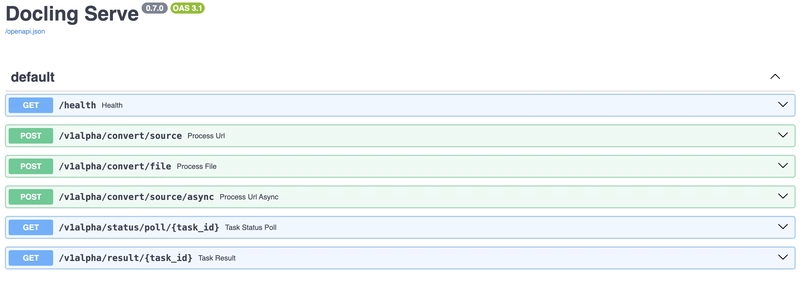
You will have three URLs to access the local server.
Server started at http://0.0.0.0:5001
Documentation at http://0.0.0.0:5001/docs
UI at http://0.0.0.0:5001/ui
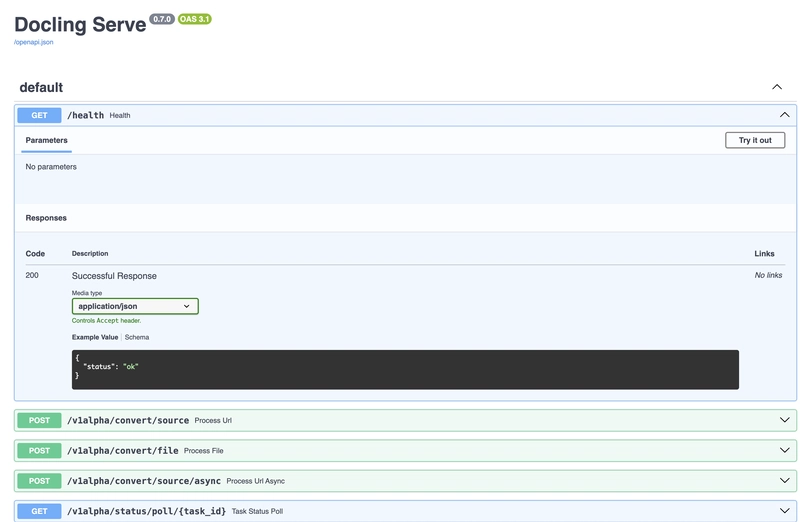
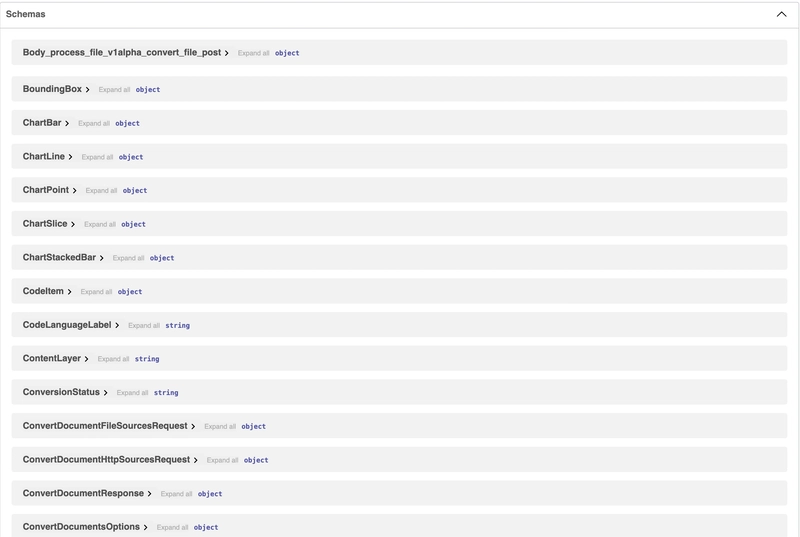
You have access to the interface using the “http://0.0.0.0:5001/docs”.
You can already test with a CURL command.
curl -X 'POST' \
'http://localhost:5001/v1alpha/convert/source' \
-H 'accept: application/json' \
-H 'Content-Type: application/json' \
-d '{
"http_sources": [{"url": "https://arxiv.org/pdf/2501.17887"}]
}'
Local Implementation with code
I also tested the service by writing a very simple Python code which is provided below.
python3.12 -m venv myenv
source myenv/bin/activate
# Using the python package
pip install --upgrade pip
pip install "docling-serve"
docling-serve run
import httpx
import asyncio
import json
import os
async def convert_from_url(url_to_convert):
"""
Asynchronously sends a URL to a local server for conversion.
Args:
url_to_convert (str): The URL of the resource to be converted.
Returns:
dict or None: The JSON response from the server if successful, None otherwise.
"""
async with httpx.AsyncClient(timeout=60.0) as async_client:
api_url = "http://localhost:5001/v1alpha/convert/source"
headers = {
'accept': 'application/json',
'Content-Type': 'application/json'
}
data = {
"http_sources": [{"url": url_to_convert}]
}
try:
response = await async_client.post(api_url, headers=headers, json=data)
response.raise_for_status() # Raise an exception for bad status codes
return response.json()
except httpx.HTTPError as e:
print(f"HTTP error occurred: {e}")
return None
except json.JSONDecodeError as e:
print(f"Error decoding JSON response: {e}")
print(f"Raw response: {response.text}")
return None
except Exception as e:
print(f"An unexpected error occurred: {e}")
return None
def write_to_file(file_path, data):
"""
Writes the given data to a file.
Args:
file_path (str): The path to the file to write to.
data (dict): The data to write (will be written as JSON).
"""
try:
with open(file_path, 'w') as f:
json.dump(data, f, indent=4) # Use indent for pretty printing
print(f"Successfully wrote data to: {file_path}")
except Exception as e:
print(f"Error writing to file {file_path}: {e}")
async def main():
"""
Main function to run the URL-based file conversion and write the output to a file.
"""
target_url = "https://arxiv.org/pdf/2501.17887"
output_file = "conversion_output.json" # You can change the filename here
result = await convert_from_url(target_url)
if result:
print("URL conversion successful!")
write_to_file(output_file, result)
else:
print("URL conversion failed. No output to write.")
if __name__ == "__main__":
asyncio.run(main())
Running the provided code as-is will provide the following JSON format output (excerpt of the output, as per my implementation).
{
"document": {
"filename": "2501.17887v1.pdf",
"md_content": "## Docling: An Efficient Open-Source Toolkit for AI-driven Document Conversion\n\nNikolaos Livathinos * , Christoph Auer * , Maksym Lysak, Ahmed Nassar, Michele Dolfi, Panagiotis Vagenas, Cesar Berrospi, Matteo Omenetti, Kasper Dinkla, Yusik Kim, Shubham Gupta, Rafael Teixeira de Lima, Valery Weber, Lucas Morin, Ingmar Meijer, Viktor Kuropiatnyk, Peter W. J. Staar\n\nIBM Research, R\u00a8 uschlikon, Switzerland\n\nPlease send correspondence to: deepsearch-core@zurich.ibm.com\n\n## Abstract\n\nWe introduce Docling , an easy-to-use, self-contained, MITlicensed, open-source toolkit for document conversion, that can parse several types of popular document formats into a unified, richly structured representation. It is powered by state-of-the-art specialized AI models for layout analysis (DocLayNet) and table structure recognition (TableFormer), and runs efficiently on commodity hardware in a small resource budget. Docling is released as a Python package and can be used as a Python API or as a CLI tool. Docling's modular architecture and efficient document representation make it easy to implement extensions, new features, models, and customizations. Docling has been already integrated in other popular open-source frameworks (e.g., LangChain, LlamaIndex, spaCy), making it a natural fit for the processing of documents and the development of high-end ...
Using the GUI
In order to access the user interface locally, either by Podman/Docker or Python code, run the following commands respectively.
# for podman
podman run -p 5001:5001 -e DOCLING_SERVE_ENABLE_UI=true quay.io/docling-project/docling-serve
# for docker
docker run -p 5001:5001 -e DOCLING_SERVE_ENABLE_UI=true quay.io/docling-project/docling-serve
pip install "docling-serve[ui]"
docling-serve run --enable-ui
####
░▒▓ ~/Devs/doclingserve-test docling-serve run --enable-ui ✔ took 21s myenv base at 09:58:06 ▓▒░
Starting production server 🚀
Server started at http://0.0.0.0:5001
Documentation at http://0.0.0.0:5001/docs
UI at http://0.0.0.0:5001/ui


Deployment on a cluster (OpenShit / Kubernetes)
In order to deploy the API server on a cluster based environment, do the following ⬇️.
kubectl apply -f docs/deploy-examples/docling-serve-oauth.yaml
# Retrieve the endpoint on an OpenShift server
DOCLING_NAME=docling-serve
DOCLING_ROUTE="https://$(oc get routes ${DOCLING_NAME} --template={{.spec.host}})"
# Retrieve the authentication token
OCP_AUTH_TOKEN=$(oc whoami --show-token)
# Make a test query
curl -X 'POST' \
"${DOCLING_ROUTE}/v1alpha/convert/source/async" \
-H "Authorization: Bearer ${OCP_AUTH_TOKEN}" \
-H "accept: application/json" \
-H "Content-Type: application/json" \
-d '{
"http_sources": [{"url": "https://arxiv.org/pdf/2501.17887"}]
}'
# docling-serve-oauth.yaml
# This example deployment configures Docling Serve with a OAuth-Proxy sidecar and TLS termination
---
apiVersion: v1
kind: ServiceAccount
metadata:
name: docling-serve
labels:
app: docling-serve
annotations:
serviceaccounts.openshift.io/oauth-redirectreference.primary: '{"kind":"OAuthRedirectReference","apiVersion":"v1 ","reference":{"kind":"Route","name":"docling-serve"}}'
---
kind: Role
apiVersion: rbac.authorization.k8s.io/v1
metadata:
name: docling-serve-oauth
labels:
app: docling-serve
component: docling-serve-api
rules:
- verbs:
- create
apiGroups:
- authorization.k8s.io
resources:
- subjectaccessreviews
- verbs:
- create
apiGroups:
- authentication.k8s.io
resources:
- tokenreviews
---
kind: RoleBinding
apiVersion: rbac.authorization.k8s.io/v1
metadata:
name: docling-serve-oauth
labels:
app: docling-serve
component: docling-serve-api
subjects:
- kind: ServiceAccount
name: docling-serve
roleRef:
apiGroup: rbac.authorization.k8s.io
kind: Role
name: docling-serve-oauth
---
apiVersion: route.openshift.io/v1
kind: Route
metadata:
name: docling-serve
labels:
app: docling-serve
component: docling-serve-api
spec:
to:
kind: Service
name: docling-serve
port:
targetPort: oauth
tls:
termination: Reencrypt
---
apiVersion: v1
kind: Service
metadata:
name: docling-serve
labels:
app: docling-serve
component: docling-serve-api
annotations:
service.alpha.openshift.io/serving-cert-secret-name: docling-serve-tls
spec:
ports:
- name: oauth
port: 8443
targetPort: oauth
- name: http
port: 5001
targetPort: http
selector:
app: docling-serve
component: docling-serve-api
---
kind: Deployment
apiVersion: apps/v1
metadata:
name: docling-serve
labels:
app: docling-serve
component: docling-serve-api
spec:
replicas: 1
selector:
matchLabels:
app: docling-serve
component: docling-serve-api
template:
metadata:
labels:
app: docling-serve
component: docling-serve-api
spec:
restartPolicy: Always
serviceAccountName: docling-serve
containers:
- name: api
resources:
limits:
cpu: 500m
memory: 2Gi
requests:
cpu: 250m
memory: 1Gi
readinessProbe:
httpGet:
path: /health
port: http
scheme: HTTPS
initialDelaySeconds: 10
timeoutSeconds: 2
periodSeconds: 5
successThreshold: 1
failureThreshold: 3
livenessProbe:
httpGet:
path: /health
port: http
scheme: HTTPS
initialDelaySeconds: 3
timeoutSeconds: 2
periodSeconds: 5
successThreshold: 1
failureThreshold: 3
env:
- name: DOCLING_SERVE_ENABLE_UI
value: 'true'
- name: UVICORN_SSL_CERTFILE
value: '/etc/tls/private/tls.crt'
- name: UVICORN_SSL_KEYFILE
value: '/etc/tls/private/tls.key'
ports:
- name: http
containerPort: 5001
protocol: TCP
volumeMounts:
- name: proxy-tls
mountPath: /etc/tls/private
imagePullPolicy: Always
image: 'ghcr.io/docling-project/docling-serve'
- name: oauth-proxy
resources:
limits:
cpu: 100m
memory: 256Mi
requests:
cpu: 100m
memory: 256Mi
readinessProbe:
httpGet:
path: /oauth/healthz
port: oauth
scheme: HTTPS
initialDelaySeconds: 5
timeoutSeconds: 1
periodSeconds: 5
successThreshold: 1
failureThreshold: 3
livenessProbe:
httpGet:
path: /oauth/healthz
port: oauth
scheme: HTTPS
initialDelaySeconds: 30
timeoutSeconds: 1
periodSeconds: 5
successThreshold: 1
failureThreshold: 3
ports:
- name: oauth
containerPort: 8443
protocol: TCP
imagePullPolicy: IfNotPresent
volumeMounts:
- name: proxy-tls
mountPath: /etc/tls/private
env:
- name: NAMESPACE
valueFrom:
fieldRef:
fieldPath: metadata.namespace
image: 'registry.redhat.io/openshift4/ose-oauth-proxy:v4.13'
args:
- '--https-address=:8443'
- '--provider=openshift'
- '--openshift-service-account=docling-serve'
- '--upstream=https://docling-serve.$(NAMESPACE).svc.cluster.local:5001'
- '--upstream-ca=/var/run/secrets/kubernetes.io/serviceaccount/service-ca.crt'
- '--tls-cert=/etc/tls/private/tls.crt'
- '--tls-key=/etc/tls/private/tls.key'
- '--cookie-secret=SECRET'
- '--openshift-delegate-urls={"/": {"group":"route.openshift.io","resource":"routes", "verb":"get","name":"docling-serve","namespace":"$(NAMESPACE)"}}'
- '--openshift-sar={"namespace":"$(NAMESPACE)","resource":"routes ","resourceName":"docling-serve","verb":"get","resourceAPIGroup":"route.open shift.io"}'
- '--skip-auth-regex=''(^/health|^/docs)'''
volumes:
- name: proxy-tls
secret:
secretName: docling-serve-tls
defaultMode: 420
Conclusion
In essence, Docling-serve effectively bridges the gap between user interaction and programmatic access. By providing both a user-friendly interface and a robust API server, it empowers end users to seamlessly harness its full spectrum of functionalities, whether through intuitive visual tools or direct API calls, offering unparalleled flexibility and accessibility.
Links
More...
Introduction
Docling offers a user-friendly interface to leverage its capabilities as an API server. While its API and comprehensive documentation undoubtedly empower the development of custom applications, Docling also features an integrated API server ready for deployment in diverse environments, from on-premise infrastructure to cloud and Kubernetes-based platforms. Let’s delve deeper into its potential.
Local Implementation with a container image
The easiest way to test the API server locally is to use Podman/Docker. To do this, just write down the following command in a terminal on your machine (assuming you have either Podman or Docker installed locally).
# Using container images, e.g. with Podman
podman run -p 5001:5001 quay.io/docling-project/docling-serve
# or
docker run -p 5001:5001 quay.io/docling-project/docling-serve
You will have three URLs to access the local server.
Server started at http://0.0.0.0:5001
Documentation at http://0.0.0.0:5001/docs
UI at http://0.0.0.0:5001/ui
You have access to the interface using the “http://0.0.0.0:5001/docs”.
You can already test with a CURL command.
curl -X 'POST' \
'http://localhost:5001/v1alpha/convert/source' \
-H 'accept: application/json' \
-H 'Content-Type: application/json' \
-d '{
"http_sources": [{"url": "https://arxiv.org/pdf/2501.17887"}]
}'
Local Implementation with code
I also tested the service by writing a very simple Python code which is provided below.
- Environment preparation.
python3.12 -m venv myenv
source myenv/bin/activate
# Using the python package
pip install --upgrade pip
pip install "docling-serve"
docling-serve run
- Sample code.
import httpx
import asyncio
import json
import os
async def convert_from_url(url_to_convert):
"""
Asynchronously sends a URL to a local server for conversion.
Args:
url_to_convert (str): The URL of the resource to be converted.
Returns:
dict or None: The JSON response from the server if successful, None otherwise.
"""
async with httpx.AsyncClient(timeout=60.0) as async_client:
api_url = "http://localhost:5001/v1alpha/convert/source"
headers = {
'accept': 'application/json',
'Content-Type': 'application/json'
}
data = {
"http_sources": [{"url": url_to_convert}]
}
try:
response = await async_client.post(api_url, headers=headers, json=data)
response.raise_for_status() # Raise an exception for bad status codes
return response.json()
except httpx.HTTPError as e:
print(f"HTTP error occurred: {e}")
return None
except json.JSONDecodeError as e:
print(f"Error decoding JSON response: {e}")
print(f"Raw response: {response.text}")
return None
except Exception as e:
print(f"An unexpected error occurred: {e}")
return None
def write_to_file(file_path, data):
"""
Writes the given data to a file.
Args:
file_path (str): The path to the file to write to.
data (dict): The data to write (will be written as JSON).
"""
try:
with open(file_path, 'w') as f:
json.dump(data, f, indent=4) # Use indent for pretty printing
print(f"Successfully wrote data to: {file_path}")
except Exception as e:
print(f"Error writing to file {file_path}: {e}")
async def main():
"""
Main function to run the URL-based file conversion and write the output to a file.
"""
target_url = "https://arxiv.org/pdf/2501.17887"
output_file = "conversion_output.json" # You can change the filename here
result = await convert_from_url(target_url)
if result:
print("URL conversion successful!")
write_to_file(output_file, result)
else:
print("URL conversion failed. No output to write.")
if __name__ == "__main__":
asyncio.run(main())
Running the provided code as-is will provide the following JSON format output (excerpt of the output, as per my implementation).
{
"document": {
"filename": "2501.17887v1.pdf",
"md_content": "## Docling: An Efficient Open-Source Toolkit for AI-driven Document Conversion\n\nNikolaos Livathinos * , Christoph Auer * , Maksym Lysak, Ahmed Nassar, Michele Dolfi, Panagiotis Vagenas, Cesar Berrospi, Matteo Omenetti, Kasper Dinkla, Yusik Kim, Shubham Gupta, Rafael Teixeira de Lima, Valery Weber, Lucas Morin, Ingmar Meijer, Viktor Kuropiatnyk, Peter W. J. Staar\n\nIBM Research, R\u00a8 uschlikon, Switzerland\n\nPlease send correspondence to: deepsearch-core@zurich.ibm.com\n\n## Abstract\n\nWe introduce Docling , an easy-to-use, self-contained, MITlicensed, open-source toolkit for document conversion, that can parse several types of popular document formats into a unified, richly structured representation. It is powered by state-of-the-art specialized AI models for layout analysis (DocLayNet) and table structure recognition (TableFormer), and runs efficiently on commodity hardware in a small resource budget. Docling is released as a Python package and can be used as a Python API or as a CLI tool. Docling's modular architecture and efficient document representation make it easy to implement extensions, new features, models, and customizations. Docling has been already integrated in other popular open-source frameworks (e.g., LangChain, LlamaIndex, spaCy), making it a natural fit for the processing of documents and the development of high-end ...
Using the GUI
In order to access the user interface locally, either by Podman/Docker or Python code, run the following commands respectively.
- Access to the UI through the container based image.
# for podman
podman run -p 5001:5001 -e DOCLING_SERVE_ENABLE_UI=true quay.io/docling-project/docling-serve
# for docker
docker run -p 5001:5001 -e DOCLING_SERVE_ENABLE_UI=true quay.io/docling-project/docling-serve
- Access to the UI through the code.
pip install "docling-serve[ui]"
docling-serve run --enable-ui
####
░▒▓ ~/Devs/doclingserve-test docling-serve run --enable-ui ✔ took 21s myenv base at 09:58:06 ▓▒░
Starting production server 🚀
Server started at http://0.0.0.0:5001
Documentation at http://0.0.0.0:5001/docs
UI at http://0.0.0.0:5001/ui
- Now we’re going to use the functionalities through the UI.
Deployment on a cluster (OpenShit / Kubernetes)
In order to deploy the API server on a cluster based environment, do the following ⬇️.
kubectl apply -f docs/deploy-examples/docling-serve-oauth.yaml
# Retrieve the endpoint on an OpenShift server
DOCLING_NAME=docling-serve
DOCLING_ROUTE="https://$(oc get routes ${DOCLING_NAME} --template={{.spec.host}})"
# Retrieve the authentication token
OCP_AUTH_TOKEN=$(oc whoami --show-token)
# Make a test query
curl -X 'POST' \
"${DOCLING_ROUTE}/v1alpha/convert/source/async" \
-H "Authorization: Bearer ${OCP_AUTH_TOKEN}" \
-H "accept: application/json" \
-H "Content-Type: application/json" \
-d '{
"http_sources": [{"url": "https://arxiv.org/pdf/2501.17887"}]
}'
# docling-serve-oauth.yaml
# This example deployment configures Docling Serve with a OAuth-Proxy sidecar and TLS termination
---
apiVersion: v1
kind: ServiceAccount
metadata:
name: docling-serve
labels:
app: docling-serve
annotations:
serviceaccounts.openshift.io/oauth-redirectreference.primary: '{"kind":"OAuthRedirectReference","apiVersion":"v1 ","reference":{"kind":"Route","name":"docling-serve"}}'
---
kind: Role
apiVersion: rbac.authorization.k8s.io/v1
metadata:
name: docling-serve-oauth
labels:
app: docling-serve
component: docling-serve-api
rules:
- verbs:
- create
apiGroups:
- authorization.k8s.io
resources:
- subjectaccessreviews
- verbs:
- create
apiGroups:
- authentication.k8s.io
resources:
- tokenreviews
---
kind: RoleBinding
apiVersion: rbac.authorization.k8s.io/v1
metadata:
name: docling-serve-oauth
labels:
app: docling-serve
component: docling-serve-api
subjects:
- kind: ServiceAccount
name: docling-serve
roleRef:
apiGroup: rbac.authorization.k8s.io
kind: Role
name: docling-serve-oauth
---
apiVersion: route.openshift.io/v1
kind: Route
metadata:
name: docling-serve
labels:
app: docling-serve
component: docling-serve-api
spec:
to:
kind: Service
name: docling-serve
port:
targetPort: oauth
tls:
termination: Reencrypt
---
apiVersion: v1
kind: Service
metadata:
name: docling-serve
labels:
app: docling-serve
component: docling-serve-api
annotations:
service.alpha.openshift.io/serving-cert-secret-name: docling-serve-tls
spec:
ports:
- name: oauth
port: 8443
targetPort: oauth
- name: http
port: 5001
targetPort: http
selector:
app: docling-serve
component: docling-serve-api
---
kind: Deployment
apiVersion: apps/v1
metadata:
name: docling-serve
labels:
app: docling-serve
component: docling-serve-api
spec:
replicas: 1
selector:
matchLabels:
app: docling-serve
component: docling-serve-api
template:
metadata:
labels:
app: docling-serve
component: docling-serve-api
spec:
restartPolicy: Always
serviceAccountName: docling-serve
containers:
- name: api
resources:
limits:
cpu: 500m
memory: 2Gi
requests:
cpu: 250m
memory: 1Gi
readinessProbe:
httpGet:
path: /health
port: http
scheme: HTTPS
initialDelaySeconds: 10
timeoutSeconds: 2
periodSeconds: 5
successThreshold: 1
failureThreshold: 3
livenessProbe:
httpGet:
path: /health
port: http
scheme: HTTPS
initialDelaySeconds: 3
timeoutSeconds: 2
periodSeconds: 5
successThreshold: 1
failureThreshold: 3
env:
- name: DOCLING_SERVE_ENABLE_UI
value: 'true'
- name: UVICORN_SSL_CERTFILE
value: '/etc/tls/private/tls.crt'
- name: UVICORN_SSL_KEYFILE
value: '/etc/tls/private/tls.key'
ports:
- name: http
containerPort: 5001
protocol: TCP
volumeMounts:
- name: proxy-tls
mountPath: /etc/tls/private
imagePullPolicy: Always
image: 'ghcr.io/docling-project/docling-serve'
- name: oauth-proxy
resources:
limits:
cpu: 100m
memory: 256Mi
requests:
cpu: 100m
memory: 256Mi
readinessProbe:
httpGet:
path: /oauth/healthz
port: oauth
scheme: HTTPS
initialDelaySeconds: 5
timeoutSeconds: 1
periodSeconds: 5
successThreshold: 1
failureThreshold: 3
livenessProbe:
httpGet:
path: /oauth/healthz
port: oauth
scheme: HTTPS
initialDelaySeconds: 30
timeoutSeconds: 1
periodSeconds: 5
successThreshold: 1
failureThreshold: 3
ports:
- name: oauth
containerPort: 8443
protocol: TCP
imagePullPolicy: IfNotPresent
volumeMounts:
- name: proxy-tls
mountPath: /etc/tls/private
env:
- name: NAMESPACE
valueFrom:
fieldRef:
fieldPath: metadata.namespace
image: 'registry.redhat.io/openshift4/ose-oauth-proxy:v4.13'
args:
- '--https-address=:8443'
- '--provider=openshift'
- '--openshift-service-account=docling-serve'
- '--upstream=https://docling-serve.$(NAMESPACE).svc.cluster.local:5001'
- '--upstream-ca=/var/run/secrets/kubernetes.io/serviceaccount/service-ca.crt'
- '--tls-cert=/etc/tls/private/tls.crt'
- '--tls-key=/etc/tls/private/tls.key'
- '--cookie-secret=SECRET'
- '--openshift-delegate-urls={"/": {"group":"route.openshift.io","resource":"routes", "verb":"get","name":"docling-serve","namespace":"$(NAMESPACE)"}}'
- '--openshift-sar={"namespace":"$(NAMESPACE)","resource":"routes ","resourceName":"docling-serve","verb":"get","resourceAPIGroup":"route.open shift.io"}'
- '--skip-auth-regex=''(^/health|^/docs)'''
volumes:
- name: proxy-tls
secret:
secretName: docling-serve-tls
defaultMode: 420
Conclusion
In essence, Docling-serve effectively bridges the gap between user interaction and programmatic access. By providing both a user-friendly interface and a robust API server, it empowers end users to seamlessly harness its full spectrum of functionalities, whether through intuitive visual tools or direct API calls, offering unparalleled flexibility and accessibility.
Links
- Docling-serve: https://github.com/docling-project/docling-serve
- Readme: https://github.com/docling-project/d...main/README.md
- Cluster deployment: https://github.com/docling-project/d.../deployment.md
- Usage: https://github.com/docling-project/d.../docs/usage.md
More...