
Step 1: Check Current Branches
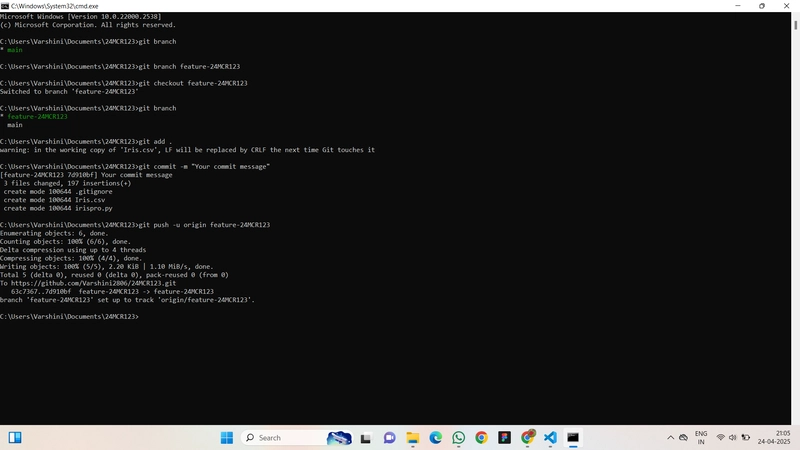
Command:git branch
Action:Lists all local branches. Shows that only the main branch exists initially.
Step 2: Create a New Branch
Command:git branch feature-24MCR123
Action:Creates a new branch named feature-24MCR123 from the current branch (main).
Step 3: Switch to the New Branch
Command:git checkout feature-24MCR123
Action:Switches the working directory to the new branch feature-24MCR123.
Step 4: Verify the Current Branch
Command:git branch
Action:Lists all branches. The active branch (feature-24MCR123) is highlighted with an asterisk *.
Step 5: Stage Changes for Commit
Command:git add .
Action:Stages all modified and newly created files for the next commit.
Step 6: Commit the Changes
Command:git commit -m "Your commit message"
Action:Commits the staged changes with a provided commit message.
Step 7: Push the Branch to Remote Repository
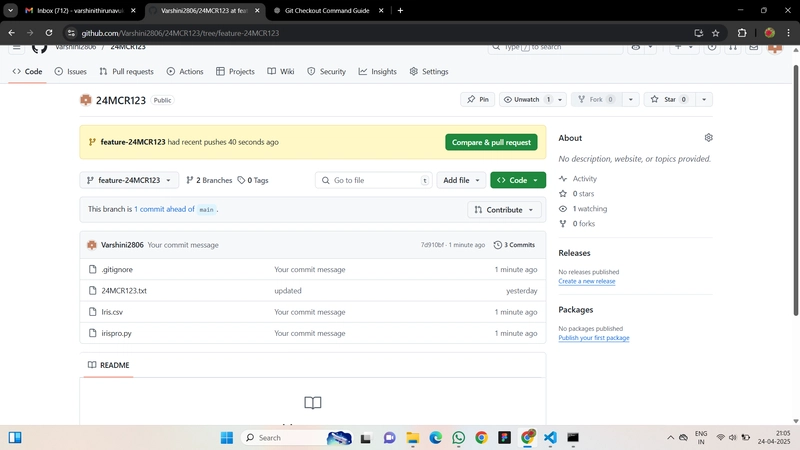
Command:git push -u origin feature-24MCR123
Action:Pushes the feature-24MCR123 branch to the remote repository (origin) and sets it to track the remote branch.
More...
Command:git branch
Action:Lists all local branches. Shows that only the main branch exists initially.
Step 2: Create a New Branch
Command:git branch feature-24MCR123
Action:Creates a new branch named feature-24MCR123 from the current branch (main).
Step 3: Switch to the New Branch
Command:git checkout feature-24MCR123
Action:Switches the working directory to the new branch feature-24MCR123.
Step 4: Verify the Current Branch
Command:git branch
Action:Lists all branches. The active branch (feature-24MCR123) is highlighted with an asterisk *.
Step 5: Stage Changes for Commit
Command:git add .
Action:Stages all modified and newly created files for the next commit.
Step 6: Commit the Changes
Command:git commit -m "Your commit message"
Action:Commits the staged changes with a provided commit message.
Step 7: Push the Branch to Remote Repository
Command:git push -u origin feature-24MCR123
Action:Pushes the feature-24MCR123 branch to the remote repository (origin) and sets it to track the remote branch.
More...