
Whether you're just getting started with Linux or refreshing your system administration skills, understanding how user accounts work is essential. In this post, I’ll walk through the basics of user accounts operations in Linux, from system users to password management and deletion to using practical commands and examples.
Table of Contents
What is a User?
In Linux, a user is an account that allows a person or a system process to log in and access system resources. Every user is associated with a unique username and identity that determines permissions and access.
Types of Users in Linux
System users are created automatically during OS installation and are used by system services. Examples: root, apache, mysql
Normal users are manually created by an administrator (root user or superuser). These users typically represent human users of the system.
Unique User Identification (UID)
Every user in Linux is assigned a UID (User ID):
The UID helps the system identify and differentiate users, even if usernames are changed.
User Account Data Storage
Linux stores user-related information in the following files:
Steps to Manage User Accounts
Create a user account:
useradd username
Terminal preview:

Set Up or Change a Password
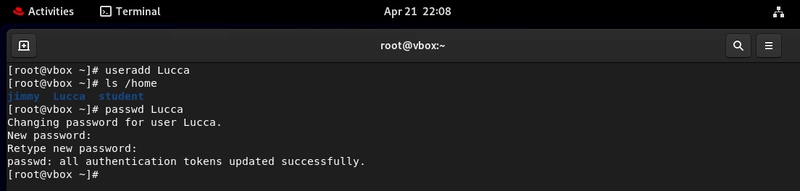
Assign a password to a user account:
passwd username
Terminal preview:
Check User Account Properties
View details about a user in /etc/passwd:
grep username /etc/passwd
Terminal preview:

Check User Password Properties
Check password settings and aging info:
grep username /etc/shadow
Terminal preview:

Switch Users
To switch from one user to another (e.g., from root to a regular user):
su username
Terminal preview:

Delete a User Account
To delete the user but keep their home directory:
userdel username
To delete the user and their home directory:
userdel -r username
Final Thoughts
Understanding user account operations is a foundational Linux skill that empowers you to manage multi-user systems securely and effectively. Whether you're managing services or supporting a team of users, these commands will come in handy every day.
If you're new to Linux, try practicing these in a test environment or virtual machine.
More...
Table of Contents
- What is a User?
- Types of Users in Linux
- Unique User Identification (UID)
- User Account Data Storage
- Steps to Manage User Accounts
- Set Up or Change a Password
- Check User Account Properties
- Check User Password Properties
- Switch Users
- Delete a User Account
- Final Thoughts
What is a User?
In Linux, a user is an account that allows a person or a system process to log in and access system resources. Every user is associated with a unique username and identity that determines permissions and access.
Types of Users in Linux
- System User
System users are created automatically during OS installation and are used by system services. Examples: root, apache, mysql
- Normal User
Normal users are manually created by an administrator (root user or superuser). These users typically represent human users of the system.
Unique User Identification (UID)
Every user in Linux is assigned a UID (User ID):
- 0–999: Reserved for system users
- 1000–60000: Assigned to normal users
The UID helps the system identify and differentiate users, even if usernames are changed.
User Account Data Storage
Linux stores user-related information in the following files:
- /etc/passwd — Stores user account properties (username, UID, home directory, shell)
- /etc/shadow — Stores encrypted passwords and password expiration information
Steps to Manage User Accounts
Create a user account:
useradd username
Terminal preview:
Set Up or Change a Password
Assign a password to a user account:
passwd username
Terminal preview:
Check User Account Properties
View details about a user in /etc/passwd:
grep username /etc/passwd
Terminal preview:
Check User Password Properties
Check password settings and aging info:
grep username /etc/shadow
Terminal preview:
Switch Users
To switch from one user to another (e.g., from root to a regular user):
su username
Terminal preview:
Delete a User Account
To delete the user but keep their home directory:
userdel username
To delete the user and their home directory:
userdel -r username
Final Thoughts
Understanding user account operations is a foundational Linux skill that empowers you to manage multi-user systems securely and effectively. Whether you're managing services or supporting a team of users, these commands will come in handy every day.
If you're new to Linux, try practicing these in a test environment or virtual machine.
More...