
Serverless CI/CD is a modern approach to software development that leverages serverless computing to automate the building, testing, and deployment of applications. By using AWS services like AWS SAM (Serverless Application Model) or AWS CDK (Cloud Development Kit) alongside GitHub Actions, you can create a fully automated CI/CD pipeline that requires minimal infrastructure management.
AWS SAM, CDK and github actions for deployment automation
Below is a guide to creating a simple AWS Lambda function, defining it using AWS SAM or AWS CDK, and setting up a GitHub Actions CI/CD pipeline to automate deployment.
Create your working repo
The structure may look like:
my-serverless-app/
├── .github/
│ └── workflows/
│ └── deploy.yml # GitHub Actions CI/CD pipeline
├── lambda_function.py # Lambda function code
├── template.yml # AWS SAM template (if using SAM)
├── cdk_app.py # AWS CDK app (if using CDK)
├── requirements.txt # Python dependencies (if any)
├── README.md # Documentation
└── (other files as needed)
Create a Simple AWS Lambda Function
Let's start by creating a basic Lambda function in Python:
# lambda_function.py
import json
def lambda_handler(event, context):
return {
'statusCode': 200,
'body': json.dumps('Hello from Lambda!')
}
Define in AWS SAM(template.yml) or AWS CDK(cdk_app.py)
Define the Lambda Function in AWS SAM (template.yml)
# template.yml
AWSTemplateFormatVersion: '2010-09-09'
Transform: AWS::Serverless-2016-10-31
Description: Simple Lambda Function
Resources:
HelloWorldFunction:
Type: AWS::Serverless::Function
Properties:
Handler: lambda_function.lambda_handler
Runtime: python3.9
CodeUri: .
Events:
HelloWorldApi:
Type: Api
Properties:
Path: /hello
Method: get
This template defines: A Lambda function (HelloWorldFunction) with the Python 3.9 runtime and an API Gateway trigger that exposes the Lambda function at the /hello endpoint.
Define the Lambda Function in AWS CDK (cdk_app.py)
Alternatively, you can use AWS CDK to define your Lambda function in Python:
# cdk_app.py
from aws_cdk import (
core,
aws_lambda as _lambda,
aws_apigateway as apigateway,
)
class CdkAppStack(core.Stack):
def __init__(self, scope: core.Construct, id: str, **kwargs) -> None:
super().__init__(scope, id, **kwargs)
# Define the Lambda function
hello_lambda = _lambda.Function(
self, 'HelloWorldFunction',
runtime=_lambda.Runtime.PYTHON_3_9,
handler='lambda_function.lambda_handler',
code=_lambda.Code.from_asset('.')
)
# Expose the Lambda function via API Gateway
apigateway.LambdaRestApi(
self, 'HelloWorldApi',
handler=hello_lambda
)
# Initialize the CDK app
app = core.App()
CdkAppStack(app, "CdkAppStack")
app.synth()
Setting up a Github Actions CI/CD Pipeline
GitHub Actions automate the deployment of your Lambda function whenever you push changes to your repository. Here's how to set it up:
Step 1: Create a GitHub Actions Workflow File
Create a .github/workflows/deploy.yml file in your repository:
name: Deploy Lambda Function
on:
push:
branches:
- main
jobs:
deploy:
runs-on: ubuntu-latest
steps:
- name: Checkout code
uses: actions/checkout@v3
- name: Set up Python
uses: actions/setup-python@v4
with:
python-version: '3.9'
- name: Install dependencies
run: |
python -m pip install --upgrade pip
pip install aws-sam-cli
- name: Configure AWS credentials
uses: aws-actions/configure-aws-credentials@v3
with:
aws-access-key-id: ${{ secrets.AWS_ACCESS_KEY_ID }}
aws-secret-access-key: ${{ secrets.AWS_SECRET_ACCESS_KEY }}
aws-region: us-east-1
- name: Build and Deploy with SAM
run: |
sam build
sam deploy --no-confirm-changeset --no-fail-on-empty-changeset
Step 2: Add AWS Credentials to GitHub Secrets
AWS_ACCESS_KEY_ID: Your AWS access key.
AWS_SECRET_ACCESS_KEY: Your AWS secret key.
Commit and push to trigger CI/CD pipeline
Push your code to the main branch to trigger the GitHub Actions workflow:
git add .
git commit -m "Initial commit with Lambda function and CI/CD pipeline"
git push origin main
Verify the Deployment
Once the pipeline runs successfully:

Go to the AWS Management Console, navigate to the API Gateway service.
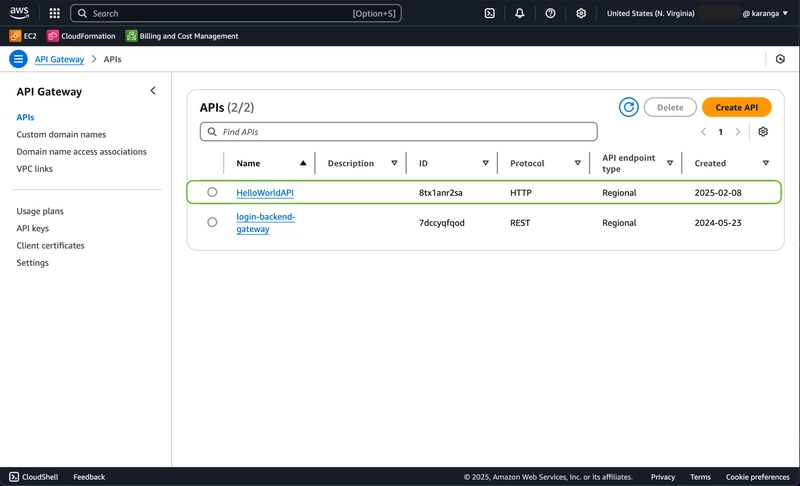
Find the deployed API and test the /hello endpoint.
Click on the API to test. Naviagate to stages and copy the invoke url, it should look like:
Open the link in a new tab and add your route, /hello.
You should see the response: "Hello from Lambda!".

Best Practices
In this guide, we walked through creating a simple Lambda function, defining it using AWS SAM or CDK, and setting up a GitHub Actions pipeline to automate deployments. We also covered troubleshooting steps to ensure your API Gateway and Lambda resources are deployed correctly.
With this approach, you can focus on writing code while AWS and GitHub Actions handle the heavy lifting of infrastructure management and deployment. Whether you're building a small project or a large-scale application, serverless CI/CD empowers you to deliver software faster and with greater reliability.
Happy coding!
Follow me for more demos and networking. Kevin Kiruri LinkedIn
More...
AWS SAM, CDK and github actions for deployment automation
Below is a guide to creating a simple AWS Lambda function, defining it using AWS SAM or AWS CDK, and setting up a GitHub Actions CI/CD pipeline to automate deployment.
Create your working repo
The structure may look like:
my-serverless-app/
├── .github/
│ └── workflows/
│ └── deploy.yml # GitHub Actions CI/CD pipeline
├── lambda_function.py # Lambda function code
├── template.yml # AWS SAM template (if using SAM)
├── cdk_app.py # AWS CDK app (if using CDK)
├── requirements.txt # Python dependencies (if any)
├── README.md # Documentation
└── (other files as needed)
Create a Simple AWS Lambda Function
Let's start by creating a basic Lambda function in Python:
# lambda_function.py
import json
def lambda_handler(event, context):
return {
'statusCode': 200,
'body': json.dumps('Hello from Lambda!')
}
Define in AWS SAM(template.yml) or AWS CDK(cdk_app.py)
Define the Lambda Function in AWS SAM (template.yml)
# template.yml
AWSTemplateFormatVersion: '2010-09-09'
Transform: AWS::Serverless-2016-10-31
Description: Simple Lambda Function
Resources:
HelloWorldFunction:
Type: AWS::Serverless::Function
Properties:
Handler: lambda_function.lambda_handler
Runtime: python3.9
CodeUri: .
Events:
HelloWorldApi:
Type: Api
Properties:
Path: /hello
Method: get
This template defines: A Lambda function (HelloWorldFunction) with the Python 3.9 runtime and an API Gateway trigger that exposes the Lambda function at the /hello endpoint.
Define the Lambda Function in AWS CDK (cdk_app.py)
Alternatively, you can use AWS CDK to define your Lambda function in Python:
# cdk_app.py
from aws_cdk import (
core,
aws_lambda as _lambda,
aws_apigateway as apigateway,
)
class CdkAppStack(core.Stack):
def __init__(self, scope: core.Construct, id: str, **kwargs) -> None:
super().__init__(scope, id, **kwargs)
# Define the Lambda function
hello_lambda = _lambda.Function(
self, 'HelloWorldFunction',
runtime=_lambda.Runtime.PYTHON_3_9,
handler='lambda_function.lambda_handler',
code=_lambda.Code.from_asset('.')
)
# Expose the Lambda function via API Gateway
apigateway.LambdaRestApi(
self, 'HelloWorldApi',
handler=hello_lambda
)
# Initialize the CDK app
app = core.App()
CdkAppStack(app, "CdkAppStack")
app.synth()
Setting up a Github Actions CI/CD Pipeline
GitHub Actions automate the deployment of your Lambda function whenever you push changes to your repository. Here's how to set it up:
Step 1: Create a GitHub Actions Workflow File
Create a .github/workflows/deploy.yml file in your repository:
name: Deploy Lambda Function
on:
push:
branches:
- main
jobs:
deploy:
runs-on: ubuntu-latest
steps:
- name: Checkout code
uses: actions/checkout@v3
- name: Set up Python
uses: actions/setup-python@v4
with:
python-version: '3.9'
- name: Install dependencies
run: |
python -m pip install --upgrade pip
pip install aws-sam-cli
- name: Configure AWS credentials
uses: aws-actions/configure-aws-credentials@v3
with:
aws-access-key-id: ${{ secrets.AWS_ACCESS_KEY_ID }}
aws-secret-access-key: ${{ secrets.AWS_SECRET_ACCESS_KEY }}
aws-region: us-east-1
- name: Build and Deploy with SAM
run: |
sam build
sam deploy --no-confirm-changeset --no-fail-on-empty-changeset
Step 2: Add AWS Credentials to GitHub Secrets
- Go to your GitHub repository.
- Navigate to Settings > Secrets > Actions.
- Add the following secrets:
AWS_ACCESS_KEY_ID: Your AWS access key.
AWS_SECRET_ACCESS_KEY: Your AWS secret key.
Commit and push to trigger CI/CD pipeline
Push your code to the main branch to trigger the GitHub Actions workflow:
git add .
git commit -m "Initial commit with Lambda function and CI/CD pipeline"
git push origin main
Verify the Deployment
Once the pipeline runs successfully:
Go to the AWS Management Console, navigate to the API Gateway service.
Find the deployed API and test the /hello endpoint.
Click on the API to test. Naviagate to stages and copy the invoke url, it should look like:

Open the link in a new tab and add your route, /hello.
You should see the response: "Hello from Lambda!".
Best Practices
- Start with SAM for simpler deployments
- Gradually adopt CDK as complexity grows
- Implement GitHub Actions early for consistent delivery
- Maintain separate configurations for different environments
In this guide, we walked through creating a simple Lambda function, defining it using AWS SAM or CDK, and setting up a GitHub Actions pipeline to automate deployments. We also covered troubleshooting steps to ensure your API Gateway and Lambda resources are deployed correctly.
With this approach, you can focus on writing code while AWS and GitHub Actions handle the heavy lifting of infrastructure management and deployment. Whether you're building a small project or a large-scale application, serverless CI/CD empowers you to deliver software faster and with greater reliability.
Happy coding!
Follow me for more demos and networking. Kevin Kiruri LinkedIn
More...